![[ARCHIVED] Spark Help Center (VISIT https://help.sparkadvisors.com/en/)](https://images.spr.so/cdn-cgi/imagedelivery/j42No7y-dcokJuNgXeA0ig/cf335720-d605-4c29-b1a1-80502bcf3a79/android-chrome-192x192/w=1920,quality=90,fit=scale-down)
Getting started
 About Spark
 AEP 2026
 Onboard to our platform
 La Plataforma en Español
 Spark Support Teams
The Spark platform
Platform Features Quote & Enroll
 Marketing
 Client Services
 Client Retention
 Record Your Calls
 Platform Changelog
Back office
 Finance & Commissions
 Contracting
 Compliance
Carrier Resources
Contacts & Events Plans & Insights
 Additional Materials
Training
 Agent Training
 Live trainings
RTS (Ready to Sell) 2026
Overview
Spark is updating our platform to display 2026 RTS (Ready to Sell) status for Agents and Agency Principals.
This enhancement provides users with a clear view of their contracting status and eligibility to sell for the 2026 plan year.
Note: Some carriers have already begun submitting 2026 RTS data, while others have not. As a result, platform visibility may vary depending on the carrier. We’ll continue to update the Help Center and notify agents as additional information becomes available.
Finding Your 2026 RTS Status
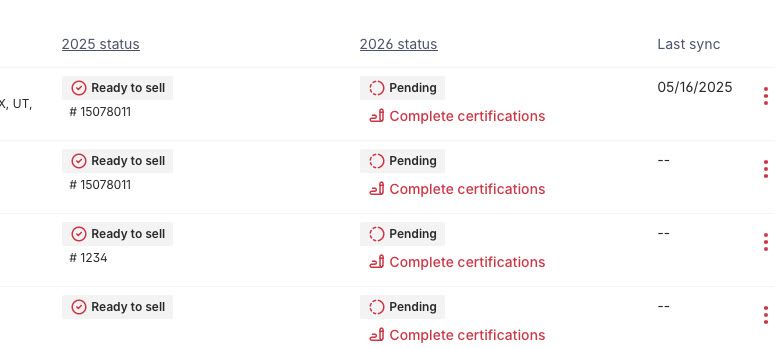
Navigate to Back Office and select View carrier contracts.

Locate the 2026 status column. If you’re marked RTS, you’ll see Ready to Sell listed.

Possible Reasons Your 2026 RTS Status Isn’t Showing
There are a few possible reasons your 2026 RTS status isn’t visible:
- The carrier hasn’t provided their 2026 RTS data yet
- Your certification or contract is still pending approval
Spark will update your status once we receive confirmation from the carrier
Inaccurate RTS Status
Please verify that your contracting and certification requirements have been fully completed. If you believe your RTS status is inaccurate, we recommend contacting your Agency Principal or reaching out to Spark Support at support@sparkadvisors.com for further assistance from the Contracting team.
Carriers Providing 2026 RTS Data
The following carriers are currently submitting 2026 RTS data:
- Alignment
- Anthem
- Banner
- BCBS AZ
- BS of CA
- Cigna (for agencies direct-to-Spark and their downlines)
- Clever Care
- Devoted
- Eternal
- FL Blue
- Freedom
- Humana
- Kelsey Seybold
- Memorial Hermann
- UnitedHealthcare
- Select Health
- Wellcare (for agencies direct-to-Spark and their downlines)
- Zing / Lasso Health
Additional carriers may begin submitting data in the coming weeks. Spark will continue to update your status as new information becomes available.